Open-source internet freedom tool
Share secure internet with the people you care about
One command sets up an undetectable proxy server — firewall, TLS, routing, all hardened by default. Share access via QR codes.
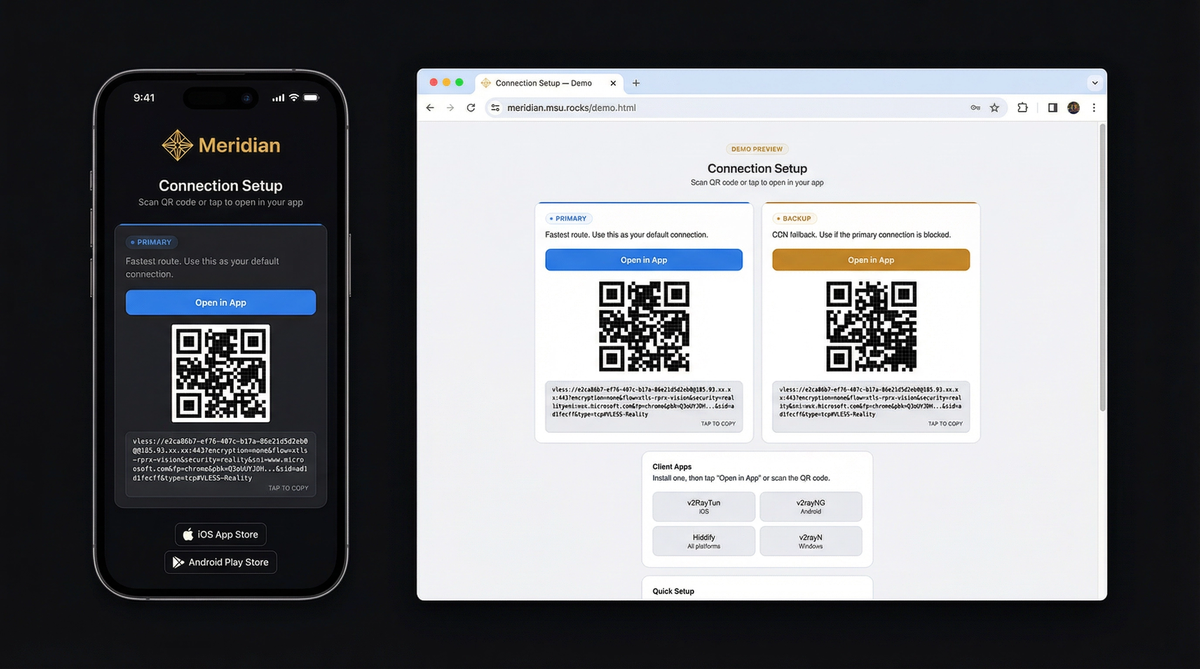
What your friends receive — see the demo
Three steps to secure internet
You need a VPS (any $5/month server) and a terminal on your laptop. Meridian handles everything else.
curl -sSf https://getmeridian.org/install.sh | bashmeridian deployThe wizard asks for your server IP and handles the rest. Or pass flags directly — see the CLI reference.
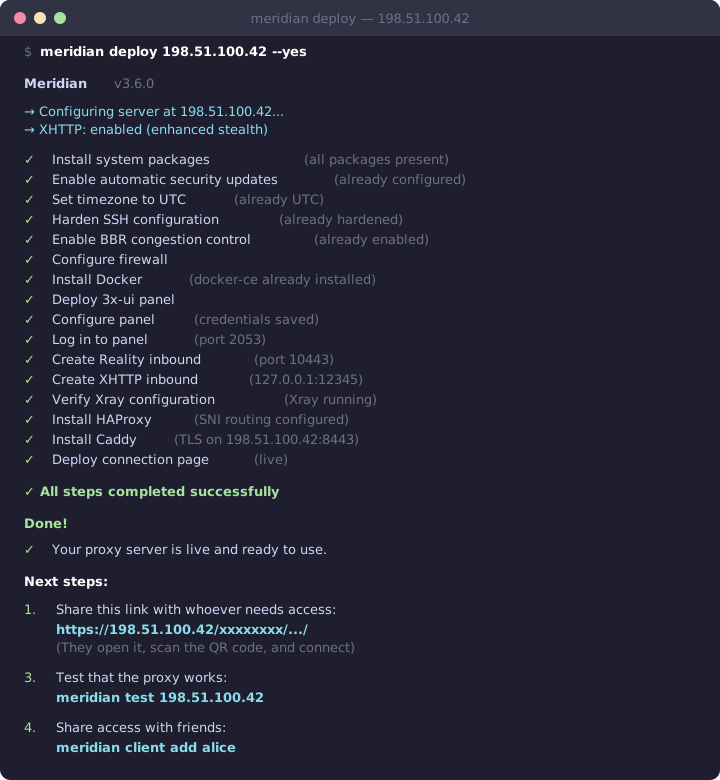
What happens behind the scenes
Build your command
Configure flags interactively and copy the full command. Supports all Meridian CLI operations.
Deploy VLESS+Reality proxy. Configures Docker, Xray, firewall, and TLS automatically.
meridian scan for optimal targets. meridian deploy
meridian deploy — the interactive wizard guides you through everything.
Why censors can't detect it
Traditional VPNs have distinctive traffic signatures. VLESS+Reality is indistinguishable from normal web browsing.
Deep Packet Inspection (DPI)
DPI analyzes traffic patterns to identify proxy protocols. VPNs like OpenVPN and WireGuard have distinctive packet signatures that are trivial to block.
VLESS+Reality produces traffic byte-for-byte identical to a normal HTTPS connection. No headers, no patterns, no packet sizes that distinguish it from regular web browsing.
Active probing
Censors connect to suspicious servers and try to fingerprint them. If a server responds differently than the website it claims to be, it gets blocked.
Reality uses the TLS certificate from a real website (e.g., microsoft.com). When a probe connects, your server completes the handshake using Microsoft's actual certificate. The probe sees a legitimate server. Only clients with your private key get the proxy tunnel.
TLS fingerprinting
Every TLS client sends a unique "Client Hello" fingerprint. Censors flag connections where the fingerprint doesn't match the claimed application.
Meridian uses uTLS to impersonate Chrome's exact TLS fingerprint — the same one used by billions of devices. Your traffic is indistinguishable from someone browsing the web with Chrome.
Scan and go
After deploying, you get a connection page with QR codes. Send it to whoever needs it — they tap once and connect.
Under the hood
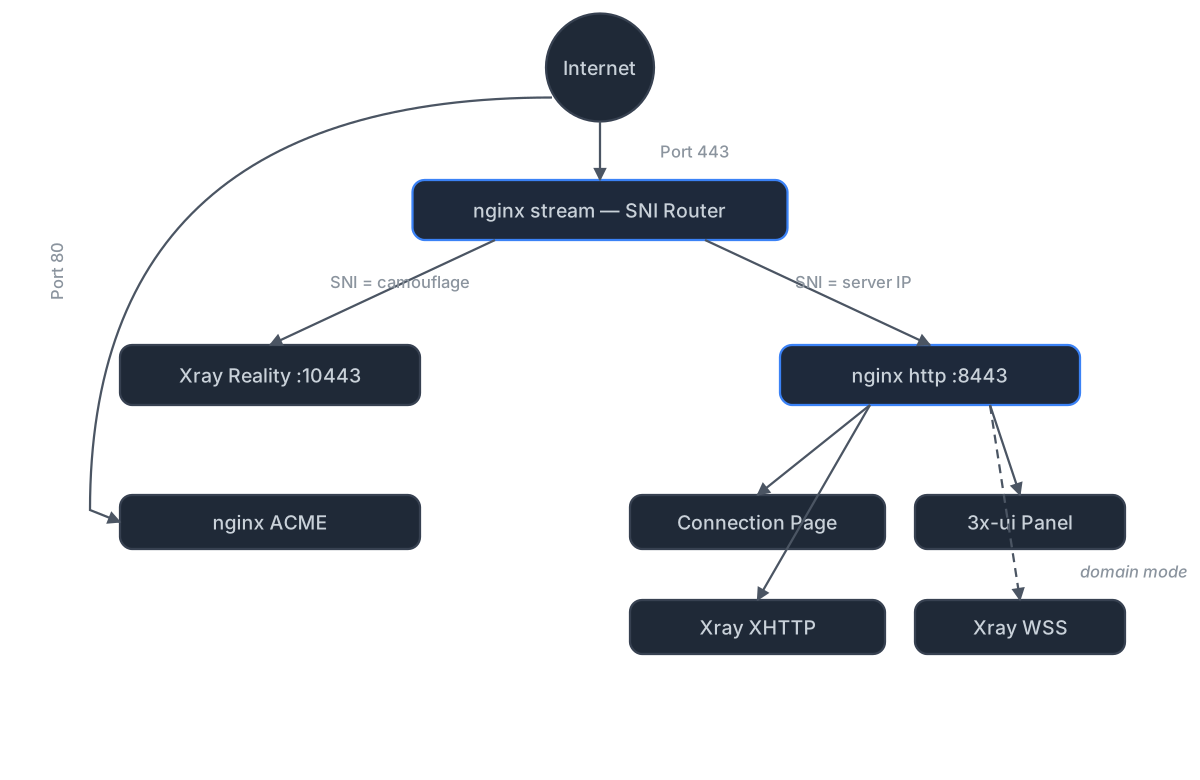
Standalone mode (no domain)
nginx sits on port 443 and routes traffic by TLS SNI using its stream module. Reality connections route to Xray, while nginx's http module handles everything else — serving connection pages over HTTPS with a Let's Encrypt IP certificate (via acme.sh). XHTTP transport runs through nginx via path-based routing — no extra port exposed.
The 3x-ui panel is reverse-proxied by nginx on a secret path — accessible via HTTPS, no SSH tunnel needed.
Domain mode (CDN fallback)
Adds three components on top of standalone:
nginx stream inspects TLS SNI without terminating encryption. nginx http terminates TLS with Let's Encrypt certificates managed by acme.sh. VLESS+WSS provides a CDN fallback through Cloudflare — works even if your server's IP is blocked.
Relay mode (domestic entry point)
A lightweight Realm TCP forwarder on a domestic server relays port 443 to your exit server abroad. All protocols work through the relay with end-to-end encryption — the relay never sees your traffic.
Deploy with meridian relay deploy RELAY_IP. Client connection
pages are automatically regenerated with relay routes.
Ready to get started?
Install Meridian, deploy to your server, and share access with the people who need it. The whole process takes about five minutes.