ابزار آزادی اینترنت
اینترنت امن را با عزیزانتان به اشتراک بگذارید
یک دستور یک سرور پراکسی غیرقابل شناسایی راهاندازی میکند — فایروال، TLS، مسیریابی، همه بهصورت پیشفرض امن. دسترسی را از طریق کدهای QR به اشتراک بگذارید.
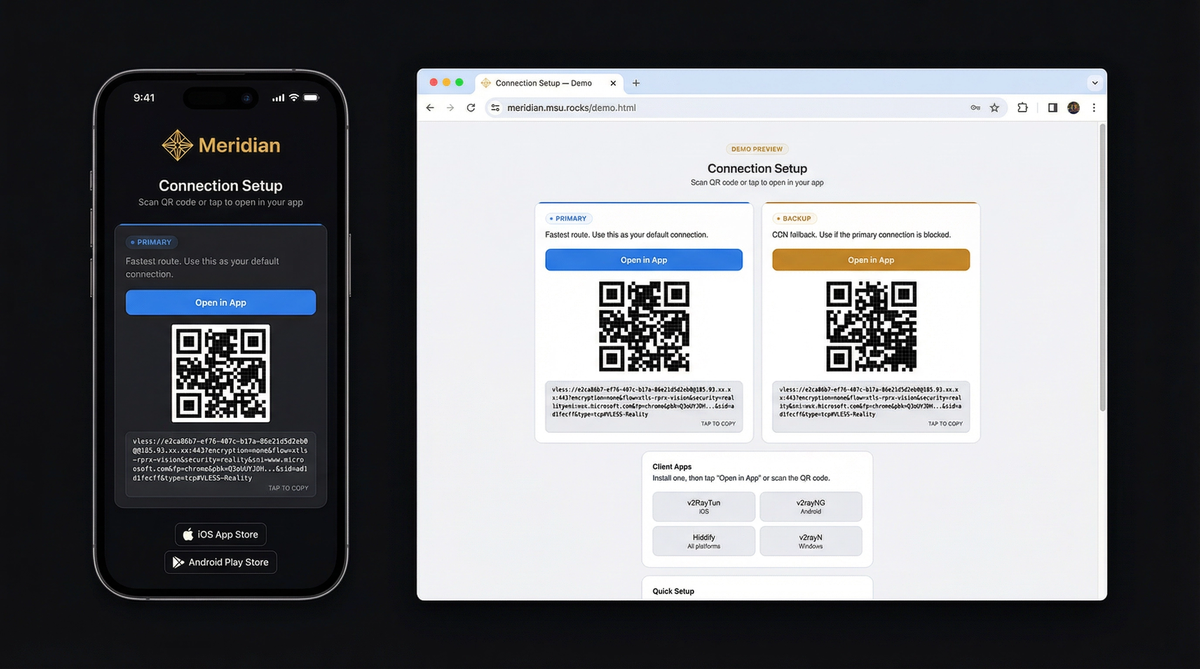
آنچه دوستان شما دریافت میکنند — نمونه را ببینید
سه مرحله تا اینترنت امن
یک VPS (هر سروری با ۵ دلار/ماه) و یک ترمینال روی لپتاپ خود نیاز دارید. Meridian بقیه کارها را انجام میدهد.
curl -sSf https://getmeridian.org/install.sh | bashmeridian deployویزارد IP سرور را میپرسد و بقیه را انجام میدهد. یا فلگها را مستقیم وارد کنید — مرجع CLI را ببینید.
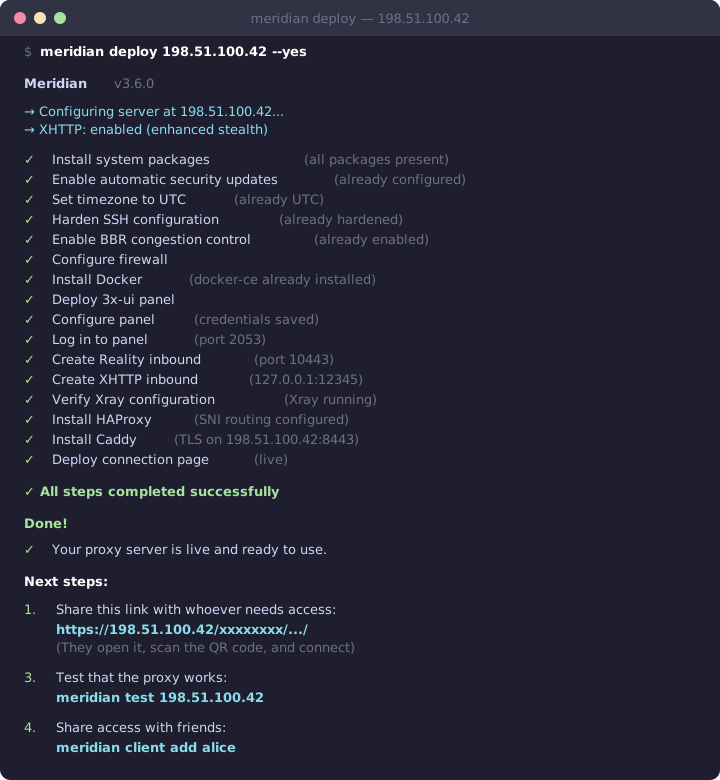
آنچه پشت صحنه اتفاق میافتد
دستور خود را بسازید
فلگها را به صورت تعاملی تنظیم کنید و دستور کامل را کپی کنید.
Deploy VLESS+Reality proxy. Configures Docker, Xray, firewall, and TLS automatically.
meridian scan for optimal targets. meridian deploy
meridian deploy — the interactive wizard guides you through everything.
چرا سانسورچیها نمیتوانند شناسایی کنند
VPNهای سنتی امضای ترافیک متمایزی دارند. VLESS+Reality از مرور عادی وب قابل تشخیص نیست.
بازرسی عمیق بسته (DPI)
DPI analyzes traffic patterns to identify proxy protocols. VPNs like OpenVPN and WireGuard have distinctive packet signatures that are trivial to block.
VLESS+Reality produces traffic byte-for-byte identical to a normal HTTPS connection. No headers, no patterns, no packet sizes that distinguish it from regular web browsing.
کاوش فعال
Censors connect to suspicious servers and try to fingerprint them. If a server responds differently than the website it claims to be, it gets blocked.
Reality uses the TLS certificate from a real website (e.g., microsoft.com). When a probe connects, your server completes the handshake using Microsoft's actual certificate. The probe sees a legitimate server. Only clients with your private key get the proxy tunnel.
اثرانگشت TLS
Every TLS client sends a unique "Client Hello" fingerprint. Censors flag connections where the fingerprint doesn't match the claimed application.
Meridian uses uTLS to impersonate Chrome's exact TLS fingerprint — the same one used by billions of devices. Your traffic is indistinguishable from someone browsing the web with Chrome.
اسکن کن و وصل شو
پس از راهاندازی، صفحهای با کدهای QR دریافت میکنید. به هر کسی که نیاز دارد بفرستید — یک ضربه و متصل میشوند.
زیر کاپوت
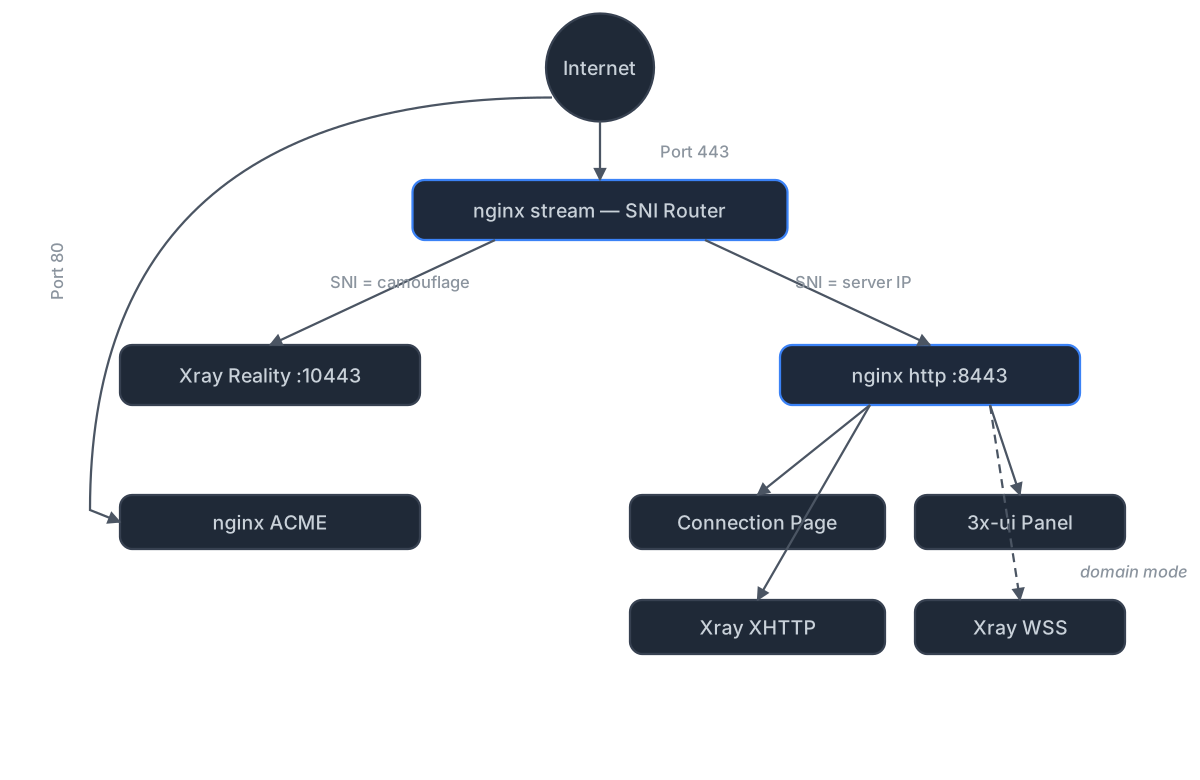
حالت مستقل (بدون دامنه)
nginx sits on port 443 and routes traffic by TLS SNI using its stream module. Reality connections route to Xray, while nginx's http module handles everything else — serving connection pages over HTTPS with a Let's Encrypt IP certificate (via acme.sh). XHTTP transport runs through nginx via path-based routing — no extra port exposed.
The 3x-ui panel is reverse-proxied by nginx on a secret path — accessible via HTTPS, no SSH tunnel needed.
حالت دامنه (CDN)
Adds three components on top of standalone:
nginx stream inspects TLS SNI without terminating encryption. nginx http terminates TLS with Let's Encrypt certificates managed by acme.sh. VLESS+WSS provides a CDN fallback through Cloudflare — works even if your server's IP is blocked.
حالت رله (نقطه ورود داخلی)
A lightweight Realm TCP forwarder on a domestic server relays port 443 to your exit server abroad. All protocols work through the relay with end-to-end encryption — the relay never sees your traffic.
Deploy with meridian relay deploy RELAY_IP. Client connection
pages are automatically regenerated with relay routes.
آماده برای شروع؟
Meridian را نصب کنید، روی سرور خود راهاندازی کنید و دسترسی را با کسانی که نیاز دارند به اشتراک بگذارید. کل فرآیند حدود پنج دقیقه طول میکشد.