Инструмент для свободы интернета
Поделитесь безопасным интернетом с близкими
Одна команда разворачивает невидимый прокси-сервер — файрвол, TLS, маршрутизация, всё настроено безопасно по умолчанию. Делитесь доступом через QR-коды.
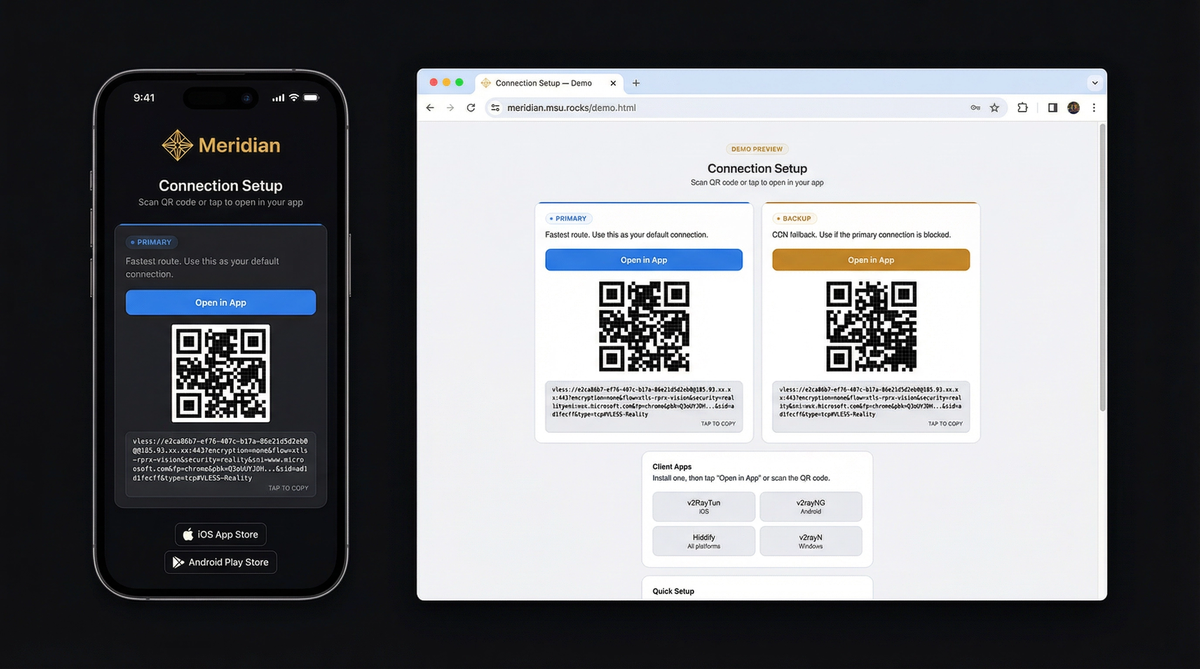
Что получают ваши друзья — смотреть демо
Три шага к безопасному интернету
Вам нужен VPS (любой сервер за $5/мес) и терминал на вашем ноутбуке. Meridian сделает всё остальное.
curl -sSf https://getmeridian.org/install.sh | bashmeridian deployМастер спросит IP сервера и настроит всё. Или передайте флаги напрямую — смотрите справочник CLI.
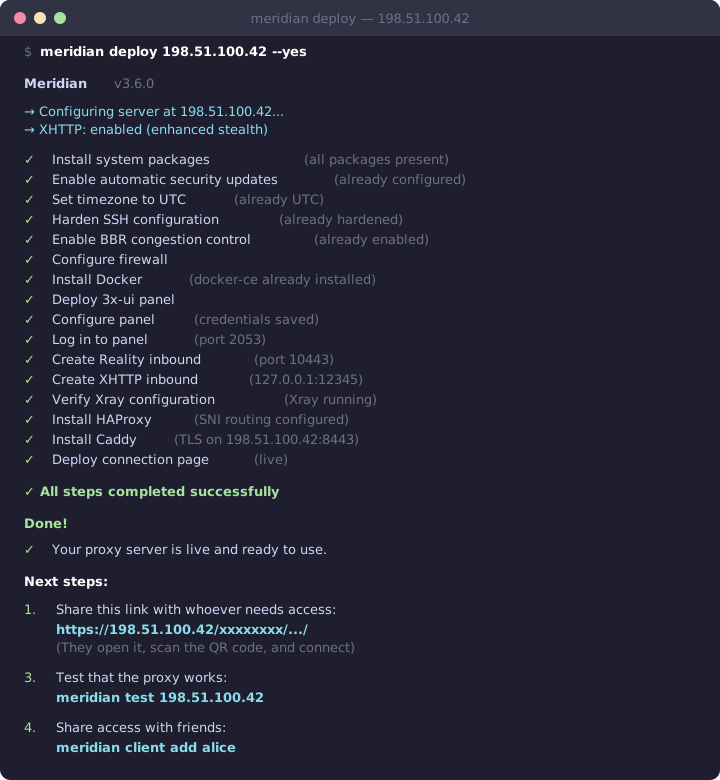
Что происходит за кулисами
Соберите команду
Настройте флаги интерактивно и скопируйте полную команду. Поддерживает все операции CLI.
Deploy VLESS+Reality proxy. Configures Docker, Xray, firewall, and TLS automatically.
meridian scan for optimal targets. meridian deploy
meridian deploy — the interactive wizard guides you through everything.
Почему цензоры не могут обнаружить
Традиционные VPN имеют характерные сигнатуры трафика. VLESS+Reality неотличим от обычного веб-серфинга.
Глубокая инспекция пакетов (DPI)
DPI analyzes traffic patterns to identify proxy protocols. VPNs like OpenVPN and WireGuard have distinctive packet signatures that are trivial to block.
VLESS+Reality produces traffic byte-for-byte identical to a normal HTTPS connection. No headers, no patterns, no packet sizes that distinguish it from regular web browsing.
Активное зондирование
Censors connect to suspicious servers and try to fingerprint them. If a server responds differently than the website it claims to be, it gets blocked.
Reality uses the TLS certificate from a real website (e.g., microsoft.com). When a probe connects, your server completes the handshake using Microsoft's actual certificate. The probe sees a legitimate server. Only clients with your private key get the proxy tunnel.
TLS-фингерпринтинг
Every TLS client sends a unique "Client Hello" fingerprint. Censors flag connections where the fingerprint doesn't match the claimed application.
Meridian uses uTLS to impersonate Chrome's exact TLS fingerprint — the same one used by billions of devices. Your traffic is indistinguishable from someone browsing the web with Chrome.
Сканируй и подключайся
После развёртывания вы получаете страницу с QR-кодами. Отправьте её кому нужно — одно нажатие и подключение готово.
Под капотом
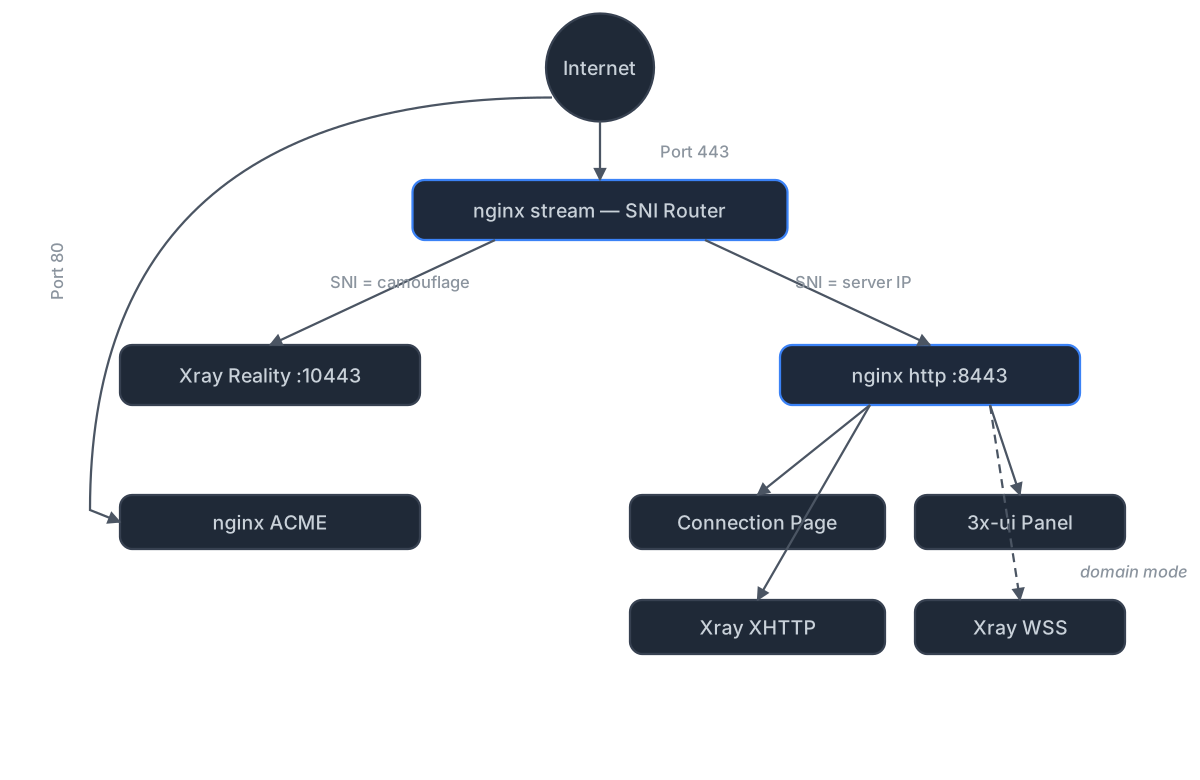
Автономный режим (без домена)
nginx sits on port 443 and routes traffic by TLS SNI using its stream module. Reality connections route to Xray, while nginx's http module handles everything else — serving connection pages over HTTPS with a Let's Encrypt IP certificate (via acme.sh). XHTTP transport runs through nginx via path-based routing — no extra port exposed.
The 3x-ui panel is reverse-proxied by nginx on a secret path — accessible via HTTPS, no SSH tunnel needed.
Доменный режим (CDN-фолбэк)
Adds three components on top of standalone:
nginx stream inspects TLS SNI without terminating encryption. nginx http terminates TLS with Let's Encrypt certificates managed by acme.sh. VLESS+WSS provides a CDN fallback through Cloudflare — works even if your server's IP is blocked.
Режим реле (внутренняя точка входа)
A lightweight Realm TCP forwarder on a domestic server relays port 443 to your exit server abroad. All protocols work through the relay with end-to-end encryption — the relay never sees your traffic.
Deploy with meridian relay deploy RELAY_IP. Client connection
pages are automatically regenerated with relay routes.
Готовы начать?
Установите Meridian, разверните на вашем сервере и делитесь доступом с теми, кому он нужен. Весь процесс занимает около пяти минут.